Project 9: Portfolio

Project Corrections / Time Spent: I spent over eight hours redoing my Event Ad, Logo, Letterhead, Business Card, Brochure, Web Page, and Montage from scratch. I also made the following corrections on my flier: I removed the two black lines to free up my white space, I made the body copy smaller, as well as the shaded triangle to free up any trapped negative space.

Message: I want to showcase my work in a professional way.

Audience: Potential clients and employers.

Top Thing Learned: A color scheme can make or break your design!  Choose your colors wisely.

Future application of Visual Media: I will look for opportunities to improve the quality of design, as well as constantly tweaking older projects as my skills increase.

Color scheme and color names: Monochromatic, white

Title Font Name & Category: Atlantic Cruise – Decorative

Copy Font Name & Category: Times New Roman – Serif

Thumbnails of Images used:

Stucco-Wall-Background-5

Sources (Links to images on orginal websites):

http://atextures.com/stucco-wall-background-five/

Project 8: Brochure

FrontP8-ChrisBazzle-Front

InsideP8-ChrisBazzle-Inside

BackP8-ChrisBazzle-Back

Video Showcase

  1. Description:  A two-sided duplex folding brochure.
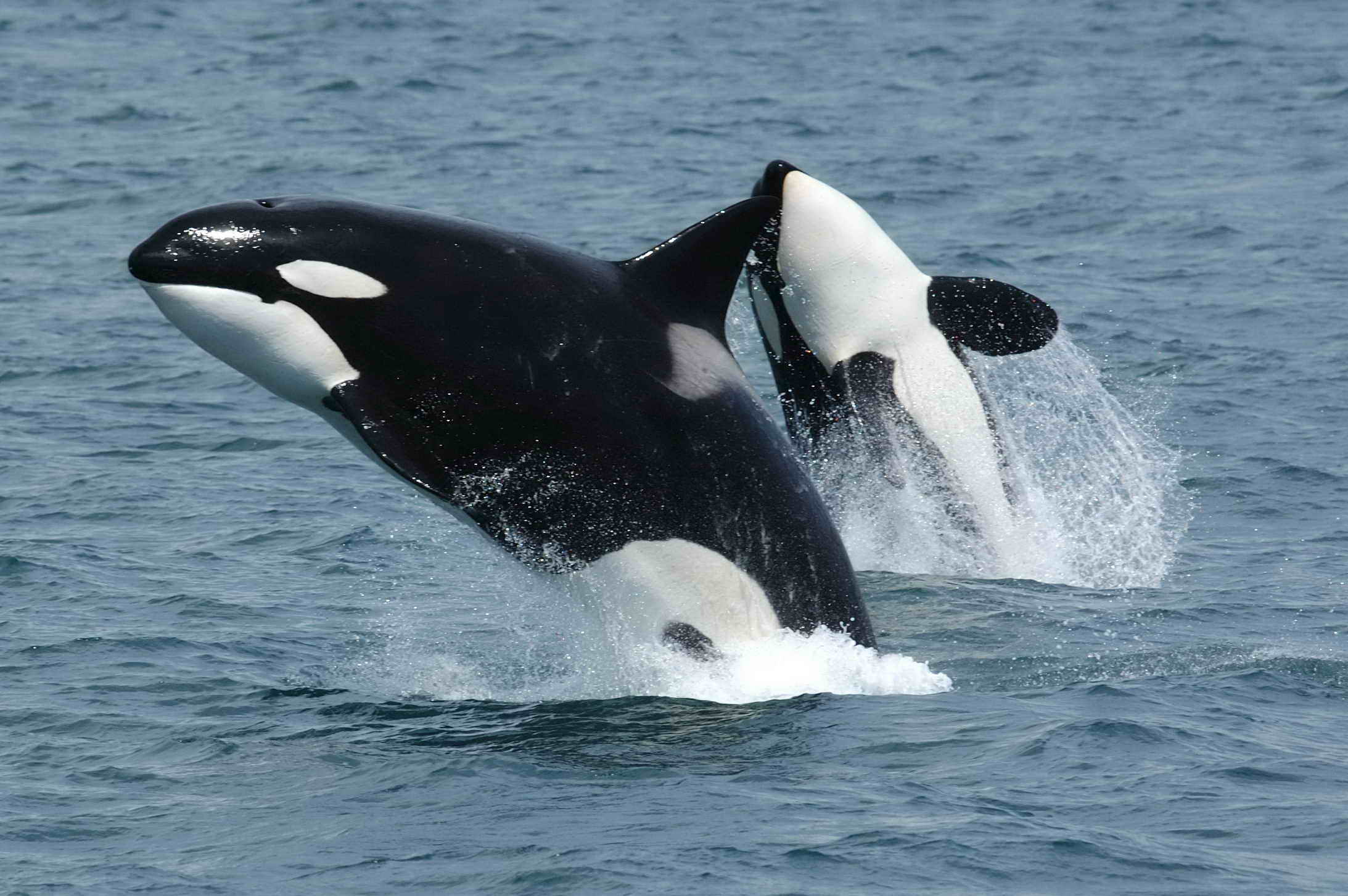
  2. Process (Programs, Tools, Skills):  I set up the gateway fold in Adobe InDesign. I split my layout into four sections with the concept that the two outer sections would be the flaps of the brochure and the two middle sections would be the ‘body’ of the brochure.  I used pictures of moving marine life to create visual flow.  I used the placement of my logo to create a clear focal point.  I made my text white to create good contrast against the blue background.

    I created the logo in Illustrator using a photograph for reference.  I used the Pen Tool to outline the basic shape of the fluke, then removed the photograph and refined my lines to give it a full, round look.

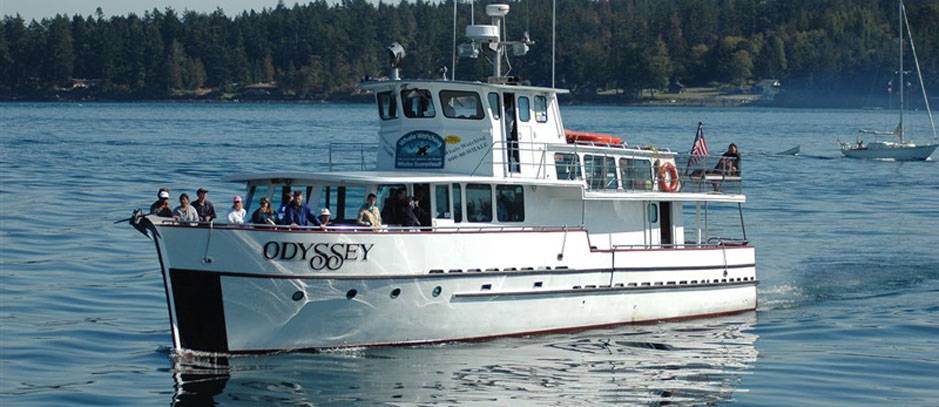
    I created the mask of the boat by using the quick selection tool in Photoshop, then refined the edges of the boat using the tool by the same name.  I finished this process by adding the changes to a new layer, then placed in into InDesign.  I then wrapped my text around the left side.

  3. Message:  Inform the public about my boat tours, giving them the necessary information to make an informed decision.
  4. Audience:  Anyone looking to spend time out at sea, and those looking to further their knowledge and love for the marine life there.
  5. Top Thing Learned:  How to wrap text around an image in InDesign.
  6. Color scheme and color names:  Analogous.  Teal, blue, and indigo
  7. Title Font Name & Category:  SignPainter/Script
  8. Copy Font Name & Category:  Minion Pro/Serif
  9. Word Count of copy:  268
  10. Thumbnails of Images used:
  11. Sources (Links to images on original websites):
    https://upload.wikimedia.org/wikipedia/commons/3/37/Killerwhales_jumping.jpg
    http://www.kickassfacts.com/wp-content/uploads/2014/01/Dolphins-620×330.jpg
    https://upload.wikimedia.org/wikipedia/commons/8/84/Humpback_whale_noaa.jpg
    http://www.watchwhales.com/2012/slideshow-images/5.jpg

Project 7: Web Page

Project Screenshot:

P7ChrisBazzleScreenshot

Description:

A web page designed to showcase a personally created logo for a fictional company.

Process (Programs, Tools, Skills):

I created this web page using Sublime Text Editor, where I utilized both HTML and CSS to create a web page that not only provided necessary information, but showcased my limited skill in web design.  I used hex codes to create a color palette that was appropriate for my logo.  I used the eyedropper tool in Photoshop to do this.  I changed my fonts to fit the design standard, then declared backups to account for viewing on various browsers.  I made sure that all of my code was up to the current standard, then used an online validator to ensure my code was valid.  Programs/Tools Used: Sublime Text Editor & Photoshop.

Message:

That my company Dumb Dog Designs is a resource for those looking for fresh digital designs.

Audience:

Anyone who is in the market for new digital designs, including logos, decals, etc.

Top Thing Learned:

How to style links in CSS.

Color scheme and color hex(s):

Monochromatic: #7a4a1e, #9e6c4a, #ffffff, #b77c4b, #e1c299

Title Font Families & Category:

Tahoma, Geneva, Sans-serif

Copy Font Families & Category:

Tahoma, Geneva, Sans-serif

Changes made to the CSS:

I changed the font families, page colors, added padding in some places, removed padding in others, added a comment, centered the image, and styled my link.

Word Count:

368 words describing my logo rationale.

Project 6 Stationery

Letterhead:P6ChrisBazzleLetterhead-01 Business Card (8.5 x 11 layout):P6ChrisBazzleBusinessCard-01-02 Business Card (large layout):P6ChrisBazzleLargeCard

  1. Description:  Matching business card and letterhead designed using an original logo.
  2. Process (Programs, Tools, Skills):  I created the logo using simple shapes in Adobe Illustrator. Once the logo was created, I opened a new two page InDesign document and placed my logo .AI file into this document.      Secondly, I created two 3×2 rectangles on the remaining artboard to mimic the basic shape and size of a business card.  I then copied/pasted the logo and contact information onto this page. I kept the logo and contact information about the same size as the information on the letterhead. I made sure that no important information came any closer than 1/8″ from the edges.

    For the letterhead, I positioned the logo near the left-middle of the top of the artboard.  I then typed my contact information into a text box and positioned it on the right hand side of the letterhead. I made both my name and phone number 20pt font to contrast with the 12pt contact information.  I also incorporated my color scheme into the name, and emboldened the number.  I added a larger transparent version of the branch as a watermark with opacity at 5%.  I used both Illustrator and InDesign.

  3. Message:  Blue Leaf Industries is a manufacturer of anti-itch creams and other high-end salves.  The blue hues represent a feeling of calmness, while the leaves represent natural ingredients and organics.
  1. Audience:  Anyone suffering from rashes, psoriasis, or other skin maladies.
  2. Top Thing Learned:  How to create a watermark, and how to use different creative cloud programs together.
  3. Color scheme and color names:  Monochromatic, blues.
  4. Title Font Name & Category:  Volkhov, Serif
  5. Copy Font Name & Category:  Tw Cen MT, Sans-serif

Project 5: Logos

ChrisBazzle-P5Logos

  1. Description:  Logo for a design company
  2. Process (Programs, Tools, Skills):  I created several different logos, each using a different color scheme while keeping the same idea in mind.  After gathering around a dozen votes, I chose the one that won out and refined the logo.  I tinkered with the color scheme until I had something that fit what I saw in my head when I thought about dogs.  I used Illustrator to create the design.
  3. Message:  We are a company that deals in artistic design.
  4. Audience:  Anyone looking for a company to design logos, icons, decals, and the like.
  5. Top Thing Learned:  How to properly use the pen tool to create shapes, as well as manipulating those lines to create bezier curves.
  6. Color Scheme and Color Names:  Monochromatic; Shades of brown.
  7. Title / Body Font Names & Categories:  Myanmar Sangam MN, Sans serif.

Project 4: Montage

P4-ChrisBazzle

Description: An inspirational montage made by the blending of two or more images, and the use of typography.

Process:

  1. I cropped the background image to 8.5×11.
  2. I evened out the lighting, vibrance, saturation, and colors of the image.
  3. I selected the picture of Christ, set my feathering to 100px then used the last tool to cut him from the image.
  4. I moved Christ into my background image and used the brush tool to properly blend Him into the original image.
  5. I added text in a contrasting color, then used a drop shadow to create additional contrast to increase legibility.
  6. Finally, I added a Gaussian Blur filter to the background image.

Programs Used: Adobe Photoshop

Message: I wanted to show that the the word of the Lord can be heard through the words of the Prophet, which are spoken at the Conference Center twice a year.

Audience: Both the heathen and the saint, the harlot and the priest.  All are invited to hear the word of the Lord.

Colorized/Filter applied and where: Gaussian Blur applied to the conference center.

Color scheme : Split Complementary and color names:  Brick, gold, blue.

Top thing learned: How to gradually blend two images.

Font Name & Category: Adobe Devanagari Italic-Serif

Thumbnails of Images used:

438284823_2e073ffcdc_b       Light-of-the-World-1

Sources (Links to images on orginal websites):

http://bookofmormonbelieve.com/files/2011/09/Light-of-the-World-1.jpg

http://farm1.static.flickr.com/183/438284823_2e073ffcdc_b.jpg

Project 3 Photodesign

P3-ChrisBazzle

Description: Demonstrate good photography and image editing skills, while utilizing good lighting, focus, and composition. Incorporating color into a poster layout with an original photo.

Process (Programs, Tools, Skills, FOCUS principles):  First I chose a color scheme; I chose one that incorporated fall colors since I planned on taking a landscape photo that showcased the beauty of Idaho.  I ended up choosing analogous.  I went out to St. Anthony and took a photo that demonstrated good lighting, sharp focus, and wonderful composition.I then brought the photo into Photoshop and used these specific editing techniques: levels, sharpness, saturation, and color balance.  Then I design an 8.5×11 layout that including my photo, text, and repeating design elements. I incorporate my color scheme title, color swatches, and color names into my design. I had to learn how to create and manipulate gradients, but Brother Pingel helped me figure it out pretty quickly.  I like the finished product; it has a very crisp, clean feeling.

Message:  I wanted to capture the natural beauty of Idaho to entice folks to visit.

Audience:  Those annoying out-of-staters that think Idaho is nothing but miles of potato fields.

Top Thing Learned:  I learned how to properly utilize the rule of thirds in my design.  I also learned to create appealing color schemes.

Color scheme and color names:  Analogous.  Gold, orange and brick.

Title Font Name & Category:  Script: Snell Roundhand Regular

Copy Font Name & Category:  Serif: STIXGeneral Regular, Script: Snell Roundhand Regular

Thumbnail of original, unedited image inserted

IMG_7823

Date and location you took the photo(s):  10.14.15, St. Anthony Idaho

P3 Activity: Photography

Light 1: Outside
Light 1: Outside
Light 2: Inside
Light 2: Inside
Focus 1: Foreground
Focus 1: Foreground
Focus 2: Background
Focus 2: Background
Composition 1: Rule of Thirds
Composition 2: Lead Room

This was a fun assignment; I’m learning a lot.  For the first photo, I metered the center on the sky, then used Vibrance to make the colors pop.  The second image was already lit pretty well, so I took out some of the yellow and sharpened up some of my lines.  For the third picture I lightened things up a lot and tried to pull the color out of the wood.

The fourth image, I blurred the tree and focused on the building in the background.  Then I brightened the image up and added more color to the bricks.  For my Thirds image, I played with the vibrancy until the colors and the brightness really popped out at you.  I kept the building on the one-third line, and the lower wall on the two-thirds line, and positioned the tree on the one-third line as well.  For my last image, I made sure to have a lot of lead room, then I worked on giving her skin a more natural tone (she was flushed after going for a run).

Project 2 Event Ad

P2ChrisBazzle-page-001

  1. Description:  An event advertisement for a food drive and fundraising lunch.
  2. Process (Programs, Tools, Skills, FOCUS principles):  I scanned the image in, then used Microsoft Word to crop and shift the image.  I added a transparent blue box over the right half, then an opaque orange box for better readability.  This created a complementary color scheme that matched well with my image.  I used repetition, color, and symmetry to create unity within my piece.  I used Microsoft Word, Epson Scanner, and PDF2JPG.net (PDF converter).
  3. Message:  I’m holding a luncheon and food drive to raise funds to help reduce poverty in other nations.
  4. Audience:  Everyone in the immediate area who is looking for a good lunch for a good cause.
  5. Color scheme and color names:  Complementary.  Orange and blue.
  6. Top Thing Learned:  How to scan, and how to convert a pdf to a jpg.
  7. Title Font Name & Category:  Akzidenz Grotesk Bold- Sans serif
  8. Copy Font Name & Category:  Adobe Caslon Pro- Serif
  9. Scanned images used, sources, original sizes, location of scanner used:  The image was scanned from a recent edition of National Geographic magazine.  It was originally 4″ x 6″, so I scanned it at 300 ppi.  Final image scan was 2122 x 1964.

P2AChrisBazzle

Project 1 Flier

Chris-Bazzle-InDesign-Flier

Description:
Black and white poster announcing a graduate leadership conference.

Process (Programs, Tools, Skills, FOCUS principles):
The first thing I did was make four sketches in an attempt to get a feel for the best layout for my message. Keeping these in mind, I then created a rough draft in InDesign. I used the dark transparent box to create alignment with the diagonal line created by the heads in the image. I also added bold lines near the title, which uses the negative space to suggest that same diagonal sweep.  I used these diagonal lines to pull the eye upward, to the large title text, to create a clear focal point.  I kept my body copy small to emphasize the most important information within the flier.  Repetition is used within the image with those beautiful graduate heads.  These tools were used together to create some decent Gestalt, and the whole flier feels pretty unified.

Message:
I’m trying to reach recent graduates. But not just ones who think they have leadership qualities. I want all graduates to feel my call to action: You can be a leader, you wonderful graduate!

Audience:
Graduates of all ages. Anyone who has recently tasted those sweet fruits of that degree-bearing tree.

Top Thing Learned:
I learned how great alignment is to unify seemingly unrelated elements.

Title Font Name & Category:
Plantagenet Cherokee — Serif

Copy Font Name & Category:
Avenir — Sans Serif

Links to images used in this project:

  1.  https://130.commbyui.org/wp-content/uploads/2013/01/JuliePeterson-  Leadership-conference-business-rexburg-Idaho_7576-as-Smart-Object-11.jpg
  2.  https://130.commbyui.org/wp-content/uploads/2013/01/VouantLogo3.png